Docker 기초 : 가상화 개념Docker Basics: Virtualization Concepts
물리 머신의 한계와 이를 극복하기 위한 가상화 기술의 종류The limits of physical machines and the kinds of virtualization that overcome them

물리 머신(physical machine)
물리 머신은 우리가 직접 만지고 볼 수 있는 실제 컴퓨터를 의미합니다. CPU, 메모리, 스토리지 등 물리적인 하드웨어로 구성되어 있으며, 단일 운영체제를 실행하는 것이 일반적입니다.

> 실체가 존재하는 물리 머신
물리 머신의 한계
물리 머신을 확장하려면 하드웨어 구입 비용뿐만 아니라 설치 공간, 전기 등 인프라적인 요소도 고려해야 합니다. 또한 물리 머신은 한번 늘려놓은 자원들을 다시 더 늘리거나, 반대로 줄일 수 있는 탄력성(elasticity)이 부족합니다.
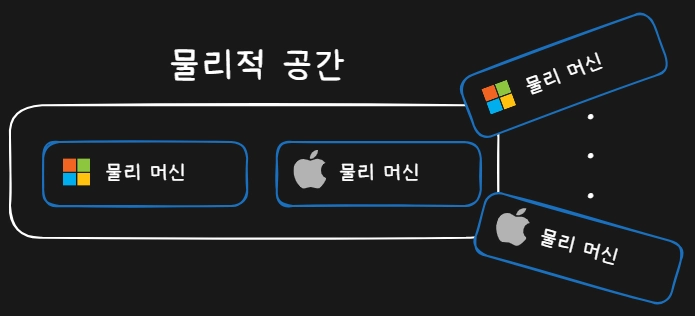
> 물리 머신은 인프라를 확장해야 하는 부담이 존재하며 탄력성 또한 떨어짐
클라우드 컴퓨팅(Cloud Computing)
아래 그래프는 시간에 따른 컴퓨팅 용량(Capacity) 관리 방식을 전통적인 하드웨어 방식과 자동화된 클라우드 방식으로 비교하여 보여주고 있습니다. 그래프에서 이야기하는 전통적인 하드웨어 방식의 한계는 다음과 같습니다.
- 대규모 자본 지출: 계단식 증가 형태로 용량을 확장해야 함
- 기회비용: 실제 수요와 제공 용량 사이의 차이로 인한 손실
- 고정적 인프라: 수요 변동에 즉각적 대응 불가능
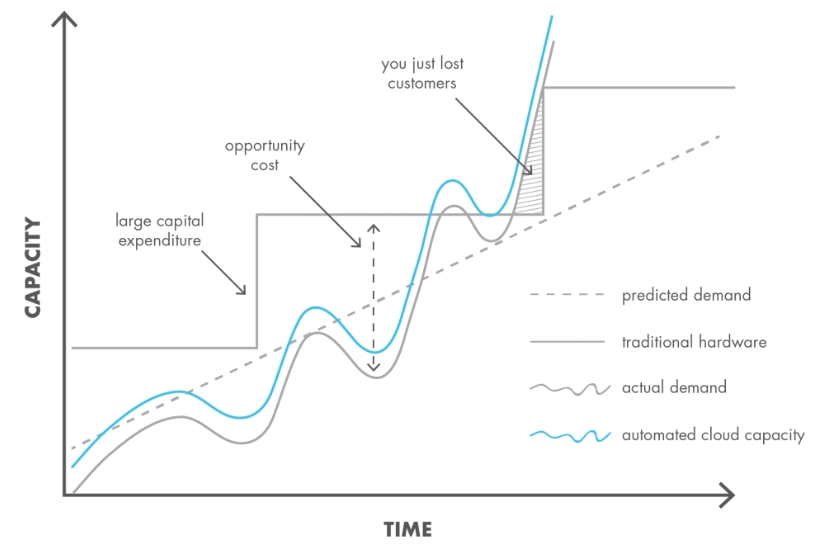
> 출처 : Cloud Computing - Benefits to the Business
이러한 한계를 극복하기 위해서, 자원을 탄력적으로 사용할 수 있는 클라우드 컴퓨팅이 발전하고 있습니다. 그리고 이 클라우드 컴퓨팅의 핵심 기술은 ‘가상화’입니다.
가상 머신(virtual machine)
가상화는 물리 머신의 리소스를 논리적으로 분할하여 사용하는 기술입니다. 물리 머신 위에 구축된 가상의 컴퓨터를 ‘가상 머신’이라 합니다. 그리고 가상화 소프트웨어가 가상 머신을 실행하고 관리합니다.
가상화 기술을 통해 하나의 물리적 시스템에서 여러 개의 가상 환경을 운영할 수 있습니다. 각 가상 머신은 독립된 운영체제(OS)와 리소스를 가지며, 완전히 격리된 환경에서 실행됩니다.
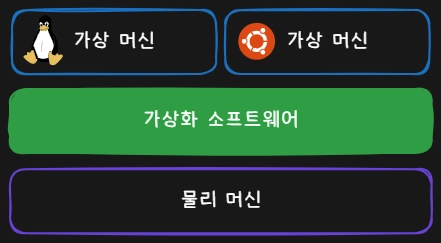
> 물리 머신 위에 가상 머신을 구축할 수 있다.
가상화 소프트웨어
가상화 소프트웨어에는 몇 가지 종류가 있습니다.
- 호스트형 가상화
- 하이퍼바이저형 가상화
- 컨테이너형 가상화
호스트(Host) OS / 게스트(Guest) OS
가상화 소프트웨어를 알기 전에 기본적인 OS의 분류를 정리하고 가겠습니다.
-
호스트 OS: 물리 머신에서 직접 작동하는 OS -
게스트 OS: 가상 머신에서 작동하는 OS
호스트형 가상화
호스트형 가상화 소프트웨어는 호스트 OS에 설치해서 게스트 OS를 관리합니다. 마치 운영체제에 크롬 브라우저를 설치하는 것처럼, 가상화 소프트웨어를 설치하고 그 안에 새로운 OS를 생성합니다.
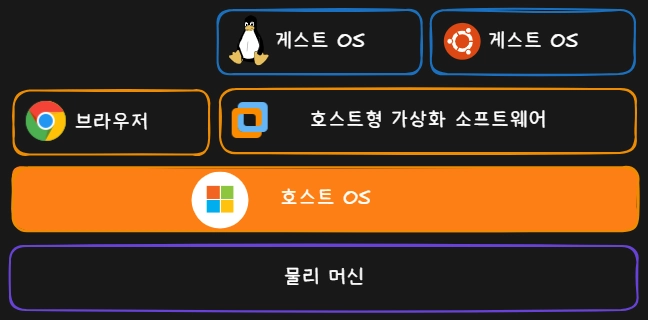
> 호스트형 가상화
장점
호스트 OS와 게스트 OS가 공존하며 호스트의 작업과 게스트의 작업을 동시에 할 수 있습니다.
단점
게스트 OS에서 하드웨어를 제어하려면 호스트 OS를 경유하기 때문에 하드웨어 관련 성능이 떨어집니다.
대표 제품
- Oracle VM VirtualBox
- VMware Fusion
하이퍼바이저형 가상화
하이퍼바이저(hypervisor)형 가상화 소프트웨어는 물리 머신에 직접 설치돼서 게스트 OS를 관리합니다.
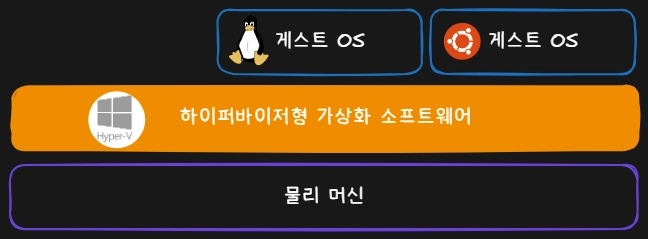
> 하이퍼바이저형 가상화
장점
호스트 OS가 존재하지 않으므로 게스트 OS에 리소스를 더 많이 할당할 수 있고, 하드웨어에 직접 접근하여 높은 성능을 낼 수 있습니다.
단점
호스트형 가상화와 다르게 호스트 OS와 공존할 수 없습니다.
대표 제품
- VMware ESXi
- Microsoft Hyper-V
- KVM (Kernel-based Virtual Machine)
- Xen
컨테이너 가상화
컨테이너(container)형 가상화는 호스트 OS의 커널을 공유하며, 프로세스 격리 기술을 사용하여 게스트 OS를 가동하지 않고 컨테이너 단위로 애플리케이션을 관리합니다.
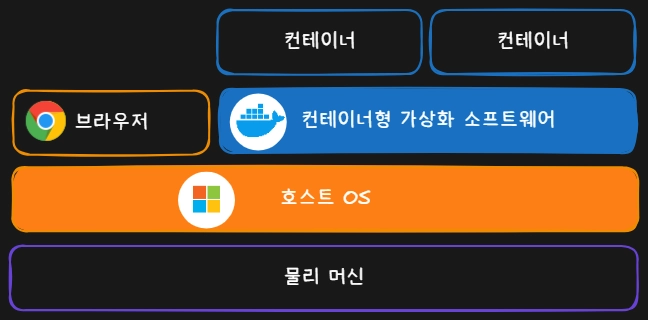
> 컨테이너 가상화
장점
게스트 OS를 가동하지 않기 때문에 리소스 소비가 적고 실행이 빠릅니다. 호스트 OS와 공존도 할 수 있습니다.
단점
게스트 OS가 없으므로 리눅스 컨테이너를 가동하려면 호스트 OS에서 리눅스 커널을 빌려야 합니다. 때문에 호스트 OS는 추가적인 방법으로 리눅스 커널을 준비해야 하는 단점이 있습니다.
대표 제품
- Docker
- Podman
마무리
도커를 배우기 전 가상화 기술에 대해서 알아 봤습니다. 다음 포스트에서는 컨테이너를 관리하는 도커 데몬(Docker Daemon)에 대해 알아봅시다!
마지막으로 각 가상화 기술을 다시 한번 정리해 보겠습니다. 😊
| 유형 | 장점 | 단점 |
|---|---|---|
| 호스트형 가상화 | 호스트 OS와 작업 공존 가능 | 하드웨어 접근 속도 저하 |
| 하이퍼바이저형 가상화 | 높은 성능 | 호스트 OS와 공존 불가 |
| 컨테이너형 가상화 | 리소스 효율성 및 빠른 실행 | 커널 의존성 |
다음으로
다음글에서 Docker 기초 : 도커 엔진, 컨테이너, 이미지의 기본 개념을 알아보겠습니다 !
Physical Machine
A physical machine is an actual computer you can see and touch. It’s made of physical hardware such as a CPU, memory and storage, and usually runs a single operating system.
> A physical machine that actually exists
Limits of Physical Machines
Scaling physical machines means thinking not only about the cost of buying hardware but also about infrastructure like floor space and electricity. Physical machines also lack elasticity: once you’ve added resources, it’s hard to grow them further or scale them back down.
> Physical machines carry the burden of expanding infrastructure and have poor elasticity
Cloud Computing
The graph below compares how computing capacity is managed over time with the traditional hardware approach versus the automated cloud approach. The limits of the traditional hardware approach it points out are:
- Large capital expenditure: capacity has to grow in steps
- Opportunity cost: losses from the gap between actual demand and provided capacity
- Fixed infrastructure: no immediate response to changes in demand
> Source: Cloud Computing - Benefits to the Business
To overcome these limits, cloud computing, which lets you use resources elastically, keeps evolving. And the core technology behind cloud computing is ‘virtualization’.
Virtual Machine
Virtualization is a technology that logically partitions a physical machine’s resources. A virtual computer built on top of a physical machine is called a ‘virtual machine’, and virtualization software runs and manages virtual machines.
Virtualization lets you run several virtual environments on one physical system. Each virtual machine has its own operating system (OS) and resources and runs in a fully isolated environment.
> You can build virtual machines on top of a physical machine.
Virtualization Software
There are a few kinds of virtualization software.
- Host-based virtualization
- Hypervisor-based virtualization
- Container-based virtualization
Host OS / Guest OS
Before getting into virtualization software, let’s sort out the basic kinds of OS.
-
Host OS: the OS running directly on the physical machine -
Guest OS: the OS running on a virtual machine
Host-Based Virtualization
Host-based virtualization software is installed on the host OS and manages guest OSes. Just like installing Chrome on your operating system, you install the virtualization software and create new OSes inside it.
> Host-based virtualization
Pros
The host OS and guest OS coexist, so you can work on the host and the guest at the same time.
Cons
To control hardware, the guest OS has to go through the host OS, so hardware-related performance suffers.
Representative Products
- Oracle VM VirtualBox
- VMware Fusion
Hypervisor-Based Virtualization
Hypervisor-based virtualization software is installed directly on the physical machine and manages guest OSes.
> Hypervisor-based virtualization
Pros
Since there’s no host OS, more resources can go to the guest OSes, and direct access to the hardware delivers high performance.
Cons
Unlike host-based virtualization, it can’t coexist with a host OS.
Representative Products
- VMware ESXi
- Microsoft Hyper-V
- KVM (Kernel-based Virtual Machine)
- Xen
Container Virtualization
Container-based virtualization shares the host OS’s kernel and uses process isolation to manage applications as containers, without booting a guest OS.
> Container virtualization
Pros
Because no guest OS is booted, it uses fewer resources and starts quickly. It can also coexist with the host OS.
Cons
With no guest OS, running Linux containers means borrowing a Linux kernel from the host OS. So the downside is that the host OS has to provide a Linux kernel by some additional means.
Representative Products
- Docker
- Podman
Wrapping Up
Before learning Docker, we looked at virtualization technologies. In the next post, let’s look at the Docker Daemon, which manages containers!
Finally, let’s recap each virtualization technology once more. 😊
| Type | Pros | Cons |
|---|---|---|
| Host-based virtualization | Work alongside the host OS | Slower hardware access |
| Hypervisor-based virtualization | High performance | Can’t coexist with a host OS |
| Container-based virtualization | Resource efficiency and fast startup | Kernel dependency |
What’s Next
In the next post, Docker Basics: Docker Engine, we’ll cover the basic concepts of containers and images!